您现在的位置是:网站首页> 编程资料编程资料
asp.net core 3.0中使用swagger的方法与问题_实用技巧_
 2023-05-24
452人已围观
2023-05-24
452人已围观
简介 asp.net core 3.0中使用swagger的方法与问题_实用技巧_
Intro#
上次更新了 asp.net core 3.0 简单的记录了一下 swagger 的使用,那个项目的 api 比较简单,都是匿名接口不涉及到认证以及 api 版本控制,最近把另外一个 api 项目升级到了 3.0,还是遇到了一些问题,这里单独写一篇文章介绍,避免踩坑。
Swagger 基本使用#
swagger 服务注册:
services.AddSwaggerGen(option => { option.SwaggerDoc("sparktodo", new OpenApiInfo { Version = "v1", Title = "SparkTodo API", Description = "API for SparkTodo", Contact = new OpenApiContact() { Name = "WeihanLi", Email = "weihanli@outlook.com" } }); // include document file option.IncludeXmlComments(Path.Combine(AppContext.BaseDirectory, $"{typeof(Startup).Assembly.GetName().Name}.xml"), true); });中间件配置:
//Enable middleware to serve generated Swagger as a JSON endpoint. app.UseSwagger(); //Enable middleware to serve swagger-ui (HTML, JS, CSS etc.), specifying the Swagger JSON endpoint app.UseSwaggerUI(option => { option.SwaggerEndpoint("/swagger/sparktodo/swagger.json", "sparktodo Docs"); option.RoutePrefix = string.Empty; option.DocumentTitle = "SparkTodo API"; });为 Swagger 添加 Bearer Token 认证#
services.AddSwaggerGen(option => { // ... // Add security definitions option.AddSecurityDefinition("Bearer", new OpenApiSecurityScheme() { Description = "Please enter into field the word 'Bearer' followed by a space and the JWT value", Name = "Authorization", In = ParameterLocation.Header, Type = SecuritySchemeType.ApiKey, }); option.AddSecurityRequirement(new OpenApiSecurityRequirement { { new OpenApiSecurityScheme { Reference = new OpenApiReference() { Id = "Bearer", Type = ReferenceType.SecurityScheme } }, Array.Empty() } }); }); 支持多个 ApiVersion#
services.AddApiVersioning(options => { options.AssumeDefaultVersionWhenUnspecified = true; options.DefaultApiVersion = ApiVersion.Default; options.ReportApiVersions = true; }); services.AddSwaggerGen(option => { // ... option.SwaggerDoc("v1", new OpenApiInfo { Version = "v1", Title = "API V1" }); option.SwaggerDoc("v2", new OpenApiInfo { Version = "v2", Title = "API V2" }); option.DocInclusionPredicate((docName, apiDesc) => { var versions = apiDesc.CustomAttributes() .OfType() .SelectMany(attr => attr.Versions); return versions.Any(v => $"v{v.ToString()}" == docName); }); option.OperationFilter(); option.DocumentFilter(); }); 自定义 Api version 相关的 OperationFilter:
public class SetVersionInPathDocumentFilter : IDocumentFilter { public void Apply(OpenApiDocument swaggerDoc, DocumentFilterContext context) { var updatedPaths = new OpenApiPaths(); foreach (var entry in swaggerDoc.Paths) { updatedPaths.Add( entry.Key.Replace("v{version}", swaggerDoc.Info.Version), entry.Value); } swaggerDoc.Paths = updatedPaths; } } public class RemoveVersionParameterOperationFilter : IOperationFilter { public void Apply(OpenApiOperation operation, OperationFilterContext context) { // Remove version parameter from all Operations var versionParameter = operation.Parameters.Single(p => p.Name == "version"); operation.Parameters.Remove(versionParameter); } }中间件配置:
//Enable middleware to serve generated Swagger as a JSON endpoint. app.UseSwagger(); //Enable middleware to serve swagger-ui (HTML, JS, CSS etc.), specifying the Swagger JSON endpoint app.UseSwaggerUI(option => { option.SwaggerEndpoint("/swagger/v2/swagger.json", "V2 Docs"); option.SwaggerEndpoint("/swagger/v1/swagger.json", "V1 Docs"); option.RoutePrefix = string.Empty; option.DocumentTitle = "SparkTodo API"; });最终 swagger 效果
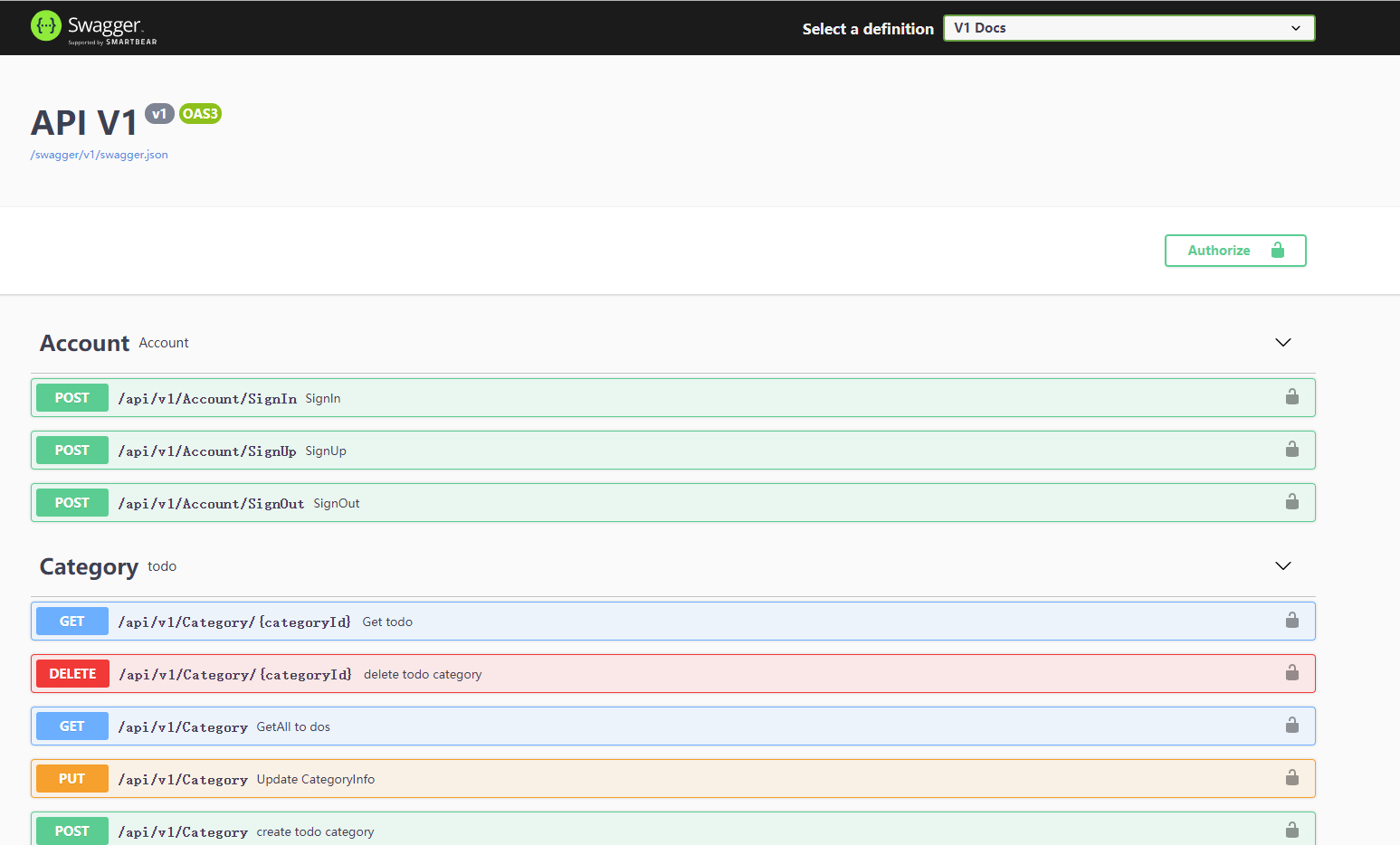

Memo#
上面的配置来自 https://github.com/WeihanLi/SparkTodo 这个项目,要获取代码可以参考这个项目
Reference#
- https://github.com/domaindrivendev/Swashbuckle.AspNetCore/tree/master/test/WebSites/MultipleVersions/Swagger
- https://stackoverflow.com/questions/58197244/swaggerui-with-netcore-3-0-bearer-token-authorization
- https://github.com/domaindrivendev/Swashbuckle.AspNetCore/issues/1295
- https://github.com/WeihanLi/SparkTodo
总结
以上就是这篇文章的全部内容了,希望本文的内容对大家的学习或者工作具有一定的参考学习价值,谢谢大家对的支持。
您可能感兴趣的文章:
相关内容
- .Net Core中ObjectPool的使用与源码解析_实用技巧_
- ASP.NET Core 过滤器中使用依赖注入知识点总结_实用技巧_
- .Net中MoongoDB的简单调用图文教程_实用技巧_
- NET Core 3.0 AutoFac内置DI替换的新姿势分享_实用技巧_
- asp.net core razor自定义taghelper的方法_实用技巧_
- .net core webapi通过中间件获取请求和响应内容的方法_实用技巧_
- .Net Core下HTTP请求IHttpClientFactory示例详解_实用技巧_
- .NET Core 微信小程序退款步骤——(统一退款)_实用技巧_
- .net core部署到windows服务上的完整步骤_实用技巧_
- asp.net大文件上传解决方案实例代码_实用技巧_